Resend an Intake Flow or Form Completion Reminder
Last updated: February 3, 2026
Providers can set up paperless intakes through Osmind, enabling a triggered set of forms (called an Intake Flow) to send to a patient for electronic completion.
Once triggered, patients receive an email notification to complete their form. There may be instances where a request needs to be resent to a patient (ie. if they had the wrong email address on file). While Osmind does not support a singular way to "re-trigger" an intake flow, providers can take the step below to resend a request to patient(s) to complete their paperwork.
Send a Form Completion Reminder
Since the intake flow was already requested for your patient to complete, it is best to resend a form completion reminder. Patients will receive a new email notification to complete their forms, even if the their email address has been updated since they started the intake flow.
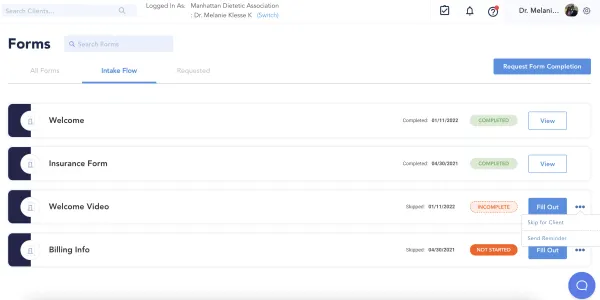
Navigate to the Patient’s Profile > Charting > View Forms > Intake Forms
Next to each Intake Form you can click the action tab [...] and select "Send Reminder"